Reduce JS
May 07, 2020
Javascript Reduce array methods
Map, filter and reduce are among the first methods that wow you when learning arrays methods. Reduce has a higher learning curve compared to the other two. I could understand it better as soon as I separated the invoking function in an external function.
This post is intended to help beginner to grasp how reduce works, if you know already how to use it and wish to correct or add something to the post please contact me or add a comment.
reduce and the MDN example
The example is used from MDN to explain how to sum of the elements of an array containing numbers using reduce.
A reduce function needs to have at least one parameter.
The first parameter contains the function that will be applied to each member of the array, while the second parameter is optional and contains the value we wish to give to the accumulator.
e.g.
[1,2,3,4].reduce((accumulator, currentValue) => accumulator + currentValue);
Above is shown a basic reduce function, when only one parameter is passed to the reduce function the accumulator takes as default value the first value of the array, in the case exposed above the accumulator is 1.
Below we console.log the values of the accumulator (acc), and the current value(next) and show each interaction

as you can see each iteration returns the sum of the array’s elements.
Divide and conquer
In the following example I extract the function I wish to pass to reduce as an external element.

note: the function above is the equivalent of
array.map( x=> x*2)
Let’s analyse the fToApply function
function fToApply(){
return (acc, next) => {
acc.push(next*2);
return acc;}
}
fToApply returns another function with two parameters return (acc, next) =>
acc is what we will use as accumulator, it is initialized while declaring reduce (the second parameter) as an empty array reduce(fToApply(), []);.
This initialization is the equivalent of writing var acc =[];
The function multiplies each element passed by 2 and pushes it in the accumulator.
Now we only need to save the new generated array const arrayDoubled = array.reduce(fToApply(), []);.
Use the accumulator as an object
As above we declare the function we wish to use with reduce in a separate statement:
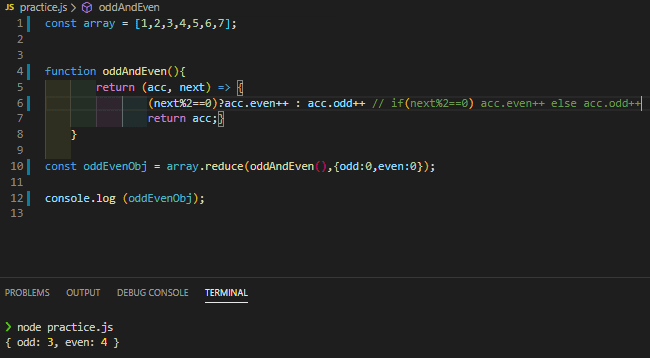
When we declare reduce array.reduce(oddAndEven(),{odd:0,even:0}); we initialize the accumulator with the object {odd:0,even:0}. Now we can use acc as an object and the oddAndEven function will rise the count of acc.even and acc.odd based on the ternary expression (next%2==0)?acc.even++ : acc.odd++.
Add index and array as parameters
Reduce requires two parameters as seen above the first is the accumulator and second represents each value of the array. There may be cases where we need to use the index or access other variable in the array, reduce gives us two optional parameters, index and array, to cope with those situations.
In this example [0,1].reduce((acc, next, index, array)) is shown how you can use the optional parameters.
In the code below we use reduce to return a new array that includes a number only if the number and its array index are both even:

The accumulator is initialized as empty array reduce(doubleEven(), []) and when both position and the number are both even we add to the accumulator both value with an object acc.push({value:next, position:index})
As for the last parameter (the array in the fourth position) here is an example of its use:

the function pushes all the numbers higher than the array length if( next>arr.length ) => acc.push(next) in a new empty array that we initialize in with [] as second parameter of our reduce function.
note: take in account that every time you use the array (fourth parameter) in your reduce function it will be evaluated every time it is called and that means that could be evaluate up to n times with n being the array lenght. The example above was only used to show how you could use the parameter but you shouldn’t use in practice